
Spec-Driven Development with AI Agents: From Build to Runtime Diagnostics
AI Security & Development


Most stories about AI-assisted development end the same way:
The AI wrote some code.
That is useful, but it is not where real engineering becomes difficult.
In real systems, the hard work begins after the code exists. You still need to verify behavior at runtime. You need to trace performance bottlenecks. And you need to debug issues that only appear during real user interactions.
That is where teams spend most of their time.
And it is where “AI that can write code” is often the least interesting capability.
In this post, I’ll walk through a practical workflow that starts with Spec-Driven Development (SDD) and extends into AI-assisted troubleshooting and diagnostics, not just code generation.
The core idea is simple:
Treat the specification as the anchor for the entire development lifecycle.
The workflow looks like this:
Start the project with a clear SPEC.md
Provide structured context and guardrails through CLAUDE.md or AGENTS.md
Use MCP servers to give AI controlled access to a live runtime
Let the AI analyze and troubleshoot real system behavior
Use those insights to tighten the loop between intent, implementation, and observed behavior
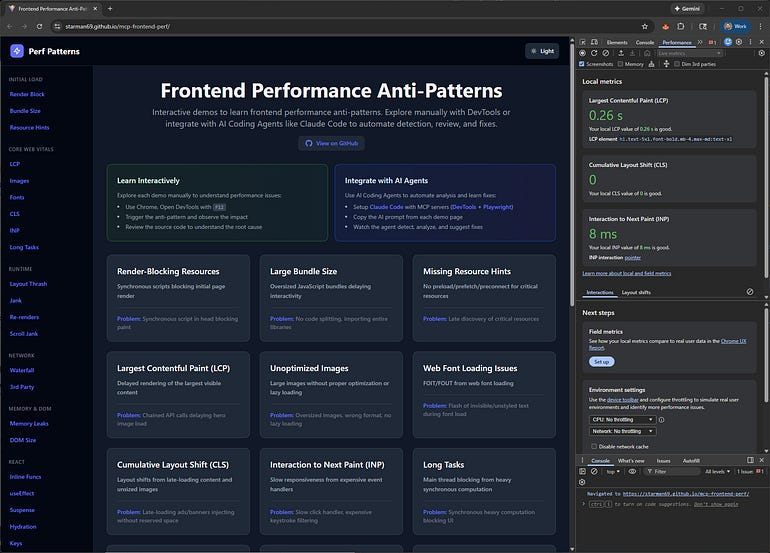
To make this concrete, the example in this post focuses on frontend performance diagnostics.
Frontend systems are a great testing ground because behavior often diverges from intent. Meaningful debugging requires real user flows, browser internals, and trace data, not just static code review.
GitHub: https://github.com/starman69/mcp-frontend-perf
Live Demo: https://starman69.github.io/mcp-frontend-perf/
Right now, I keep this workflow human-in-the-loop. The AI accelerates exploration, analysis, and reporting, but I remain responsible for judgment and decisions.
Over time, this structure can evolve into automated or semi-automated feedback loops once the guardrails and tools are well defined.
This post walks through that progression step by step using a real application, real tooling, and real runtime behavior.
Starting with Spec-Driven Development
Everything in this project begins with Spec-Driven Development.
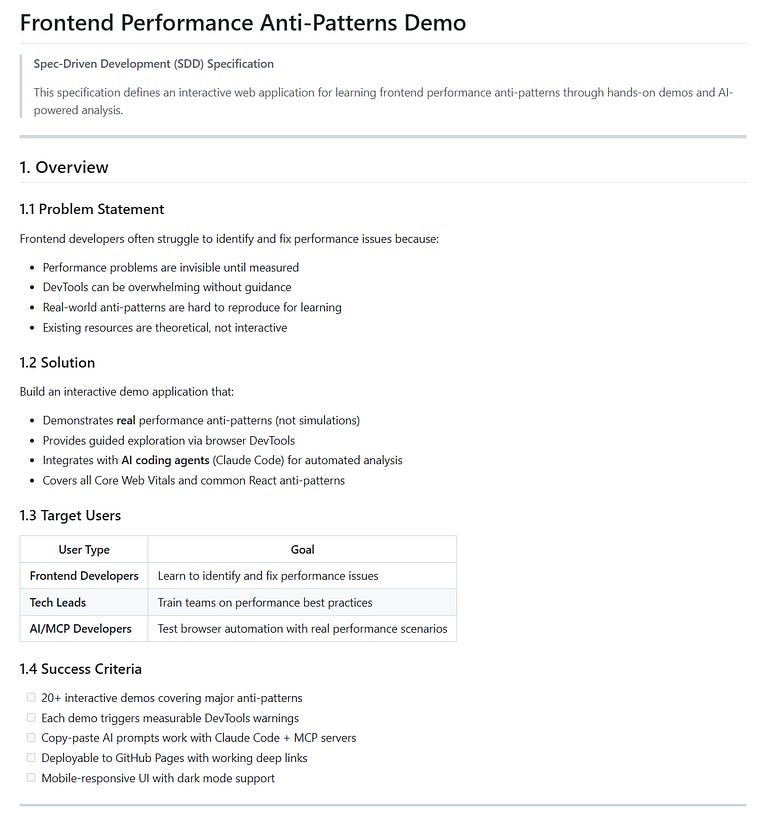
Before any components were written or tooling configured, the project started with a SPEC.md file.
This was not a lightweight outline or a list of goals. It was a structured specification describing what the system should be, how it should behave, and where its boundaries exist.
If you want a deeper look at the philosophy behind this approach, I covered it in an earlier article:
Spec-Driven Development: Designing Before You Code (Again)
The spec defined:
The problem statement and success criteria
User flows and navigation paths
A catalog of frontend performance anti-patterns
Expected runtime behavior for each demo
Component contracts and UI requirements
Directory structure and file placement
TypeScript interfaces and shared data models
Implementation phases with completion criteria
Expectations for AI usage and diagnostics
The most important detail is timing.
The spec was written before implementation and treated as the authoritative reference.
For humans, this reduces ambiguity and rework.
For AI systems, it removes guesswork.
The spec becomes the anchor the entire workflow can reference, whether generating code, navigating the application, or diagnosing runtime issues.
SPEC.md Structure
The specification included sections such as:
Overview
User Stories
Functional Requirements
Non-Functional Requirements
Technical Architecture
Data Models
Component Contracts
Implementation Tasks
AI / MCP Integration Specification
Acceptance Criteria Summary
Supporting appendices included:
Demo specifications
Color system
Route map
Spec-Driven Development Is Gaining Momentum
This approach is no longer isolated.
Across the industry, there is growing interest in treating specifications as first-class engineering artifacts, not documentation written after the fact.
You can see this shift in projects like Spec-Kit, which focuses on making specifications executable and central to development workflows.
There is also renewed attention around ideas from Domain-Driven Design (DDD), where shared language and clear system boundaries come before implementation.
What has changed is the context.
AI-assisted development raises the cost of ambiguity.
When AI agents are involved, unclear intent does not just slow things down, it introduces real risk.
Specifications stop being helpful guidance and become constraints that shape system behavior.
This project reflects that shift:
Spec-Driven Development provides the foundation
Context files translate intent into operational guidance for AI
Runtime access allows observed behavior to feed back into development
The result is not a new methodology.
It is an evolution where specs remain relevant long after the first line of code is written.
They guide how systems are built, explored, diagnosed, and improved.
Providing Context and Guardrails for AI
A strong spec defines intent.
But AI systems also need operational context.
Without it, agents waste time rediscovering basic information about the project or make incorrect assumptions.
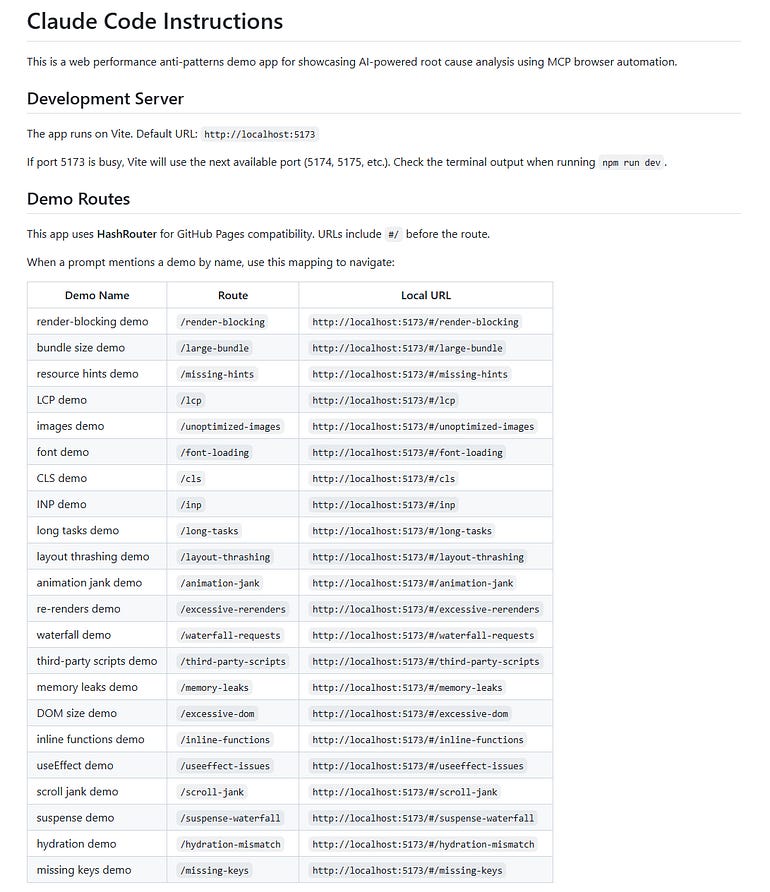
To address this, the project includes a dedicated agent context file.
In this case the file is CLAUDE.md, though AGENTS.md would serve the same purpose.
This file is written specifically for AI assistants and includes information that would otherwise clutter a human-focused README.
For example:
How to run the development server
The application routing strategy
A full route table mapping demos to URLs
Which tools should be used for different tasks
Common analysis and diagnostic workflows
Pointers to relevant source code locations
This allows an AI assistant to operate more like a teammate who already understands the project.
The separation of responsibilities looks like this:
README.md explains the project to humans
SPEC.md defines intent, constraints, and contracts
CLAUDE.md / AGENTS.md explains how AI agents should operate within those constraints
That separation improves both predictability and safety.
CLAUDE.md Structure
Typical sections include:
Development Server
Demo Routes
MCP Server Usage
Common Analysis Patterns
Key Element Selectors
Source Code Locations
Performance Insights Available
Detecting React Anti-Patterns
Moving Beyond Code Generation with MCP
At this stage, AI can already help build the application.
The more interesting step is extending that assistance into runtime observation.
This is where Model Context Protocol (MCP) comes in.
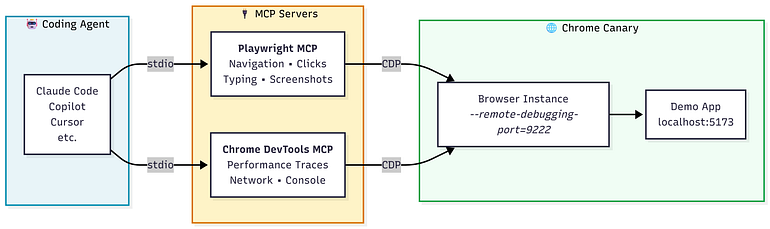
Instead of asking AI to reason from static code alone, MCP allows it to interact with a running system through explicitly defined tools.
This project uses two MCP servers:
Playwright MCP
Handles browser navigation and user interaction.
Chrome DevTools MCP
Provides performance traces, network analysis, and browser-level diagnostics.
This setup gives the AI controlled, auditable access to the runtime environment.
The distinction is important.
The agent is not free to explore the system arbitrarily. It can only act through tools you explicitly expose.
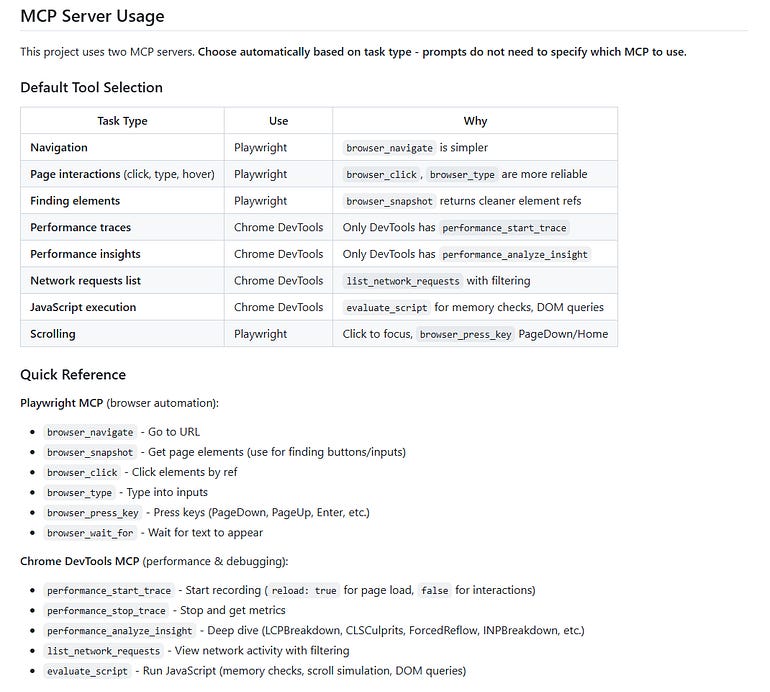
With this setup, the AI can:
Navigate to specific demo routes
Trigger known user interactions
Start and stop performance recordings
Analyze DevTools insights such as layout shifts or forced reflows
Produce reports tied directly to source code
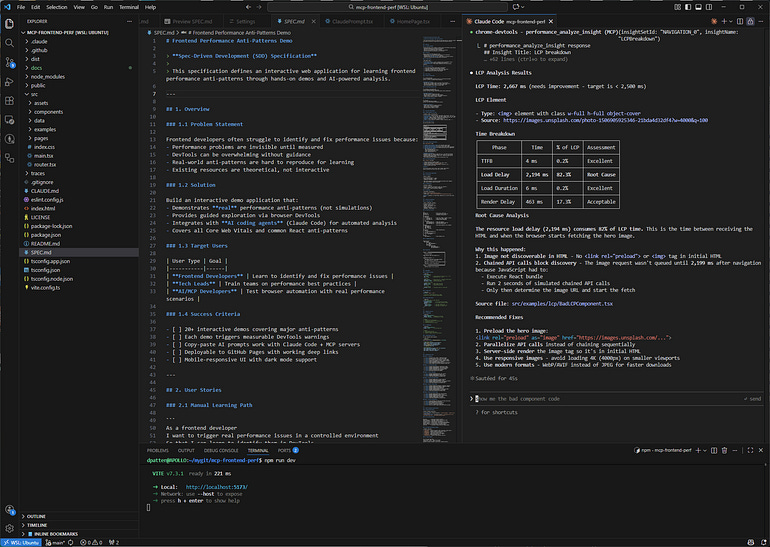
AI assistance moves from speculation to observation.
Using AI to Diagnose Real Runtime Behavior
The demo application intentionally triggers known frontend performance anti-patterns.
This makes runtime behavior visible and repeatable.
Traditionally, diagnosing these problems involves several manual steps:
Opening DevTools
Recording traces manually
Interpreting flame charts
Correlating metrics back to source code
Repeating the process across environments
With MCP-enabled AI assistance, these steps become a repeatable workflow.
A typical diagnostic flow looks like this:
Navigate to a known route
Trigger a specific interaction
Record a performance trace
Run targeted analysis
Summarize findings with source code references
This does not replace human expertise.
But it dramatically reduces the time engineers spend gathering data.
They can focus instead on deciding what to do about it.
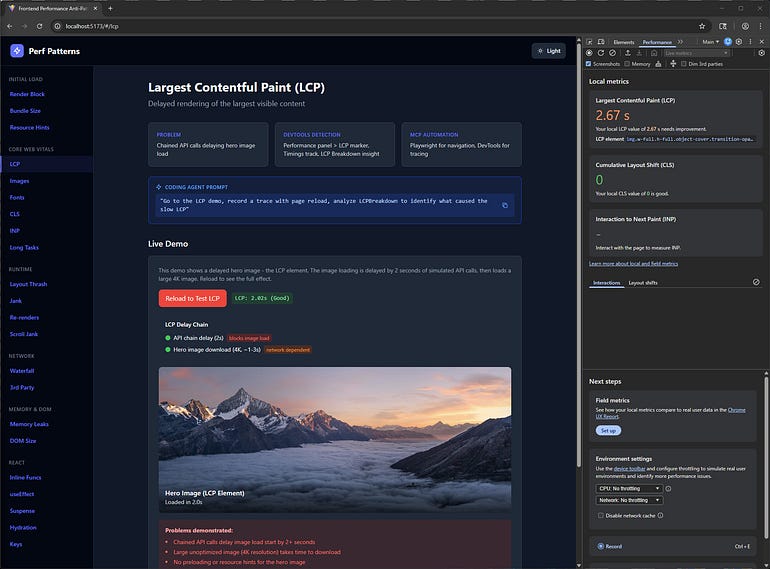
Example prompt:
LCP Analysis
“Go to the LCP demo, record a trace with page reload, and analyze LCPBreakdown to identify what caused the slow LCP.”
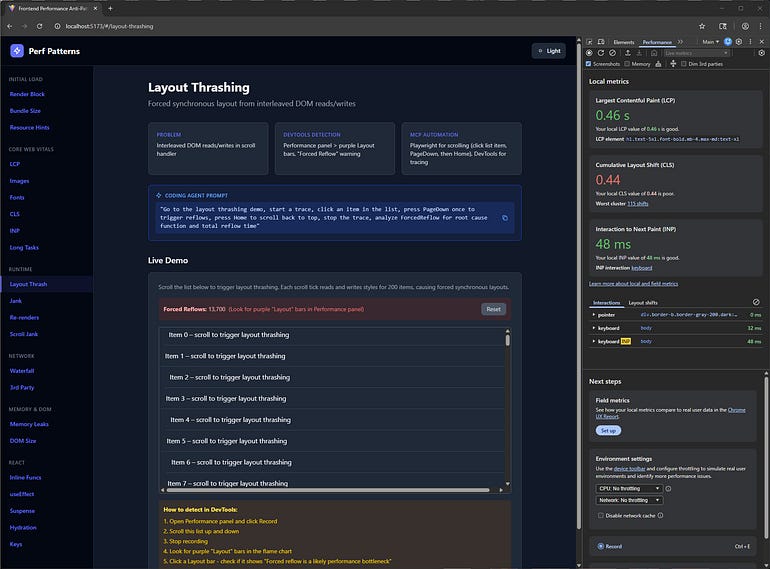
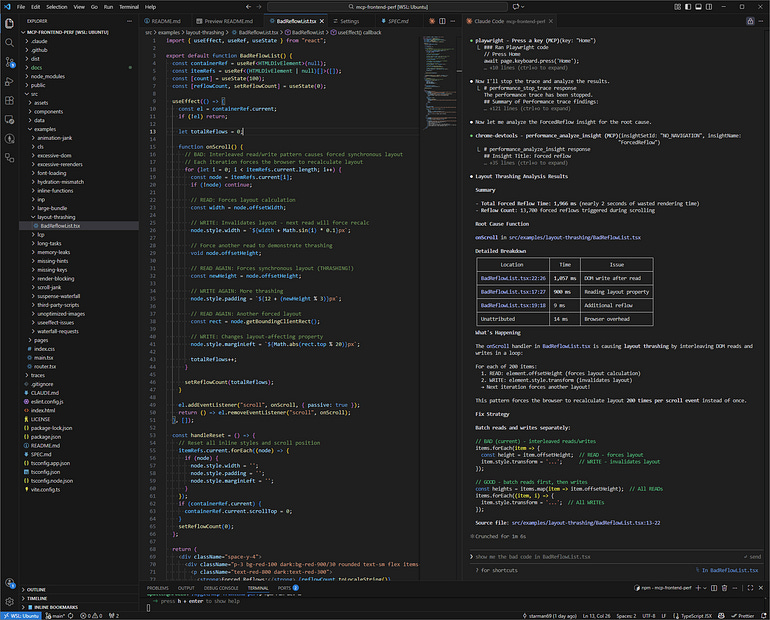
Layout Thrashing Analysis
“Go to the layout thrashing demo, start a trace, click a list item, press PageDown to trigger reflows, press Home to scroll back to the top, stop the trace, and analyze ForcedReflow for the root cause function and total reflow time.”
Creating a Feedback Loop Between Spec, Code, and Runtime
One of the most valuable outcomes of this approach is the feedback loop it creates.
Because everything is anchored to the spec:
Observed behavior can be compared directly with intended behavior
Deviations become explicit instead of anecdotal
Spec updates can drive code changes
Runtime diagnostics can influence future design decisions
Today this loop is still human-driven.
I review the results, decide what matters, and update the system.
But the structure naturally supports more automation later:
Regression checks tied to spec expectations
Agent-generated reports when behavior drifts
Guardrails preventing changes that violate spec constraints
The key point is this:
Automation becomes possible because the spec exists, not because the AI becomes smarter.
Why Frontend Performance Is a Good Showcase
Frontend performance is an ideal domain for demonstrating this approach.
Several factors make it particularly useful:
Runtime behavior often diverges from design intent
Problems depend heavily on user interactions
Diagnosis requires real browser instrumentation
Results are measurable and visible
If AI-assisted development can work reliably here without creating chaos, it can work in many other areas of software engineering.
Conclusion: Spec-Driven Development Enables the Full Loop
This project illustrates a broader view of AI-assisted development.
Not as a replacement for engineers.
Not as a shortcut for generating code.
But as a way to tighten the feedback loop between intent, implementation, and observed behavior.
The pieces work together:
Spec-Driven Development provides the foundation
Context files guide AI behavior
MCP tools enable controlled runtime access
Together they allow AI to participate across the system lifecycle:
Building, observing, diagnosing, and eventually feeding insights back into design.
That progression is intentional.
It also explains why specifications become even more important once AI enters the picture.
Prompts are temporary.
Specs persist.
They define what is allowed, what is expected, and what deviations actually mean.
If you are experimenting with AI-assisted development today, start with the fundamentals:
Write the spec
Define explicit agent context
Constrain tool access
Then let AI operate against real systems
That is where AI-assisted development begins to deliver real engineering value.
References and Further Reading
mcp-frontend-perf (GitHub): Reference implementation including SPEC.md, agent context, and MCP setup. https://github.com/starman69/mcp-frontend-perf
Spec-Driven Development: Designing Before You Code (Again): https://medium.com/@dave-patten/spec-driven-development-designing-before-you-code-again-21023ac91180
Spec-Kit:
https://github.com/github/spec-kit
Want the full deep dive? Check out my full article on Medium.
🚀 Stay tuned for more posts in AI Security & Development! Follow for more insights on securing AI, cloud, and modern web platforms.
AI Security & Development - AI table of contents included.
Spec-Driven Development with AI Agents: From Build to Runtime Diagnostics